
4강 · 영상 + 꿀팁 도구
Seedance 2.0 Pro 스토리보드 워크플로로 광고 회사 수준 시네마틱 영상 만들기. ChatGPT GPTs + Dreamina 풀 파이프라인 + 글로벌 검증 워크플로 7선.
- 예상 읽기
- 약 16분
- 실습 시간
- 75분
- 과정 순서
- 8번째 · 총 11강
이 강의에서 다루는 도구와 주제
4강 · 영상 + 꿀팁 도구들
소상공인을 위한 AI 마케팅 교육 4강. 이미지에서 영상으로, 실무 노하우를 배웁니다. 2강에서 만든 사진을 그대로 활용하기 때문에 별도 준비 없이 바로 시작할 수 있습니다. 실전 팁: 2강에서 만든 이미지를 갤러리에 저장해두었다면 이번 강의 실습에 바로 쓸 수 있습니다.
이미지만으로 충분할까?
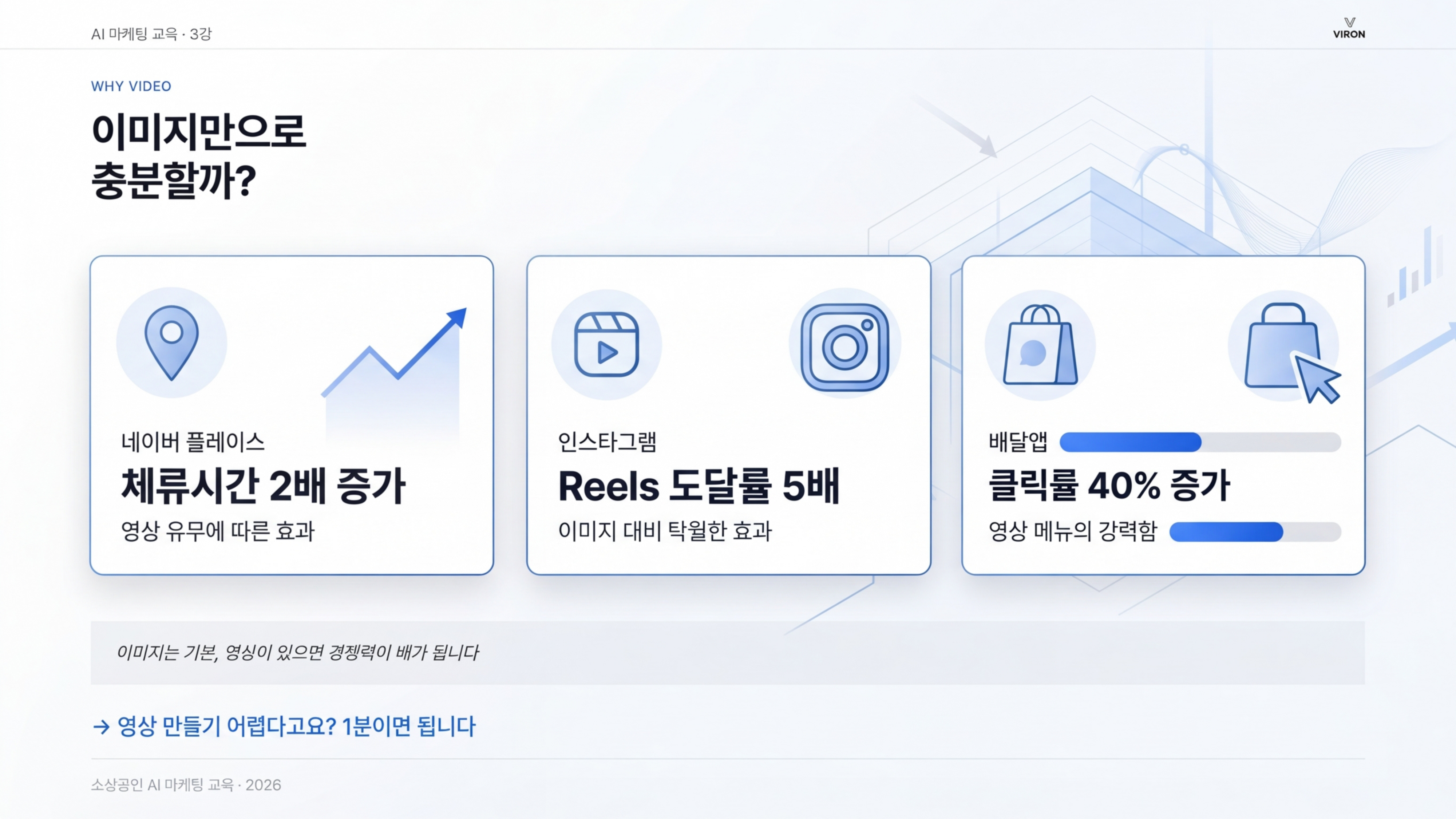
| 채널 | 영상 효과 |
|---|---|
| 네이버 플레이스 | 체류시간 2배 증가 |
| 인스타그램 | Reels 도달률 5배 |
| 배달앱 | 클릭률 40% 증가 |
사진이 있으면 70점, 영상까지 있으면 100점입니다. 경쟁 가게들이 사진만 올리는 동안 내가 영상까지 올리면 그것만으로도 상위 20%에 들 수 있습니다. 예전엔 영상 촬영과 편집에 수십만 원이 들었지만 이제는 사진 한 장만 있으면 AI가 1분 만에 영상으로 만들어줍니다. 실전 팁: 영상은 처음에 10초짜리 하나만 만들어서 네이버 플레이스에 올려보세요. 체류시간 변화가 바로 느껴집니다.
이미지는 기본, 영상이 있으면 경쟁력이 배가 됩니다. 영상 만들기 어렵다고요? 1분이면 됩니다.
📦 참고 · 구버전 Google Veo 3.1 (접혀 있음 — 클릭해 펼치기)
Veo는 *"사진 1장만 넣고 짧은 모션 한 줄"*로 빠르게 영상을 만드는 구버전 대안입니다. 이 강의는 Seedance 2.0 Pro 스토리보드 워크플로가 메인입니다.
| 항목 | 값 |
|---|---|
| 입력 | 이미지 + 모션 한 줄 |
| 비용 | FAST 20크레딧 / QUALITY 100크레딧 (AI Pro 월 29,000원 = 1,000크레딧) |
| 결과 | 사진이 살아 움직이는 자연스러운 영상 |
| 한계 | 광고 스토리보드 제어 불가, 제품 일관성 보통, 시네마틱 질감 부족 |
| 추천 용도 | 일상 SNS 콘텐츠, 빠른 모션 테스트 |
바로가기: Google Flow (Veo)
🎬 Seedance 2.0 Pro 사용법
ByteDance(틱톡 모회사)가 2026년에 공개한 모델. 지금 출시된 AI 영상 중 최고 수준입니다 — 자연스러운 카메라 무빙, 사실적인 질감, 안정적인 제품 일관성. CapCut의 Dreamina 플랫폼에서 사용합니다.
Dreamina (Seedance 2.0 Pro)
CapCut의 AI 영상 생성 플랫폼. Seedance 2.0 Pro 모델 사용 가능.
핵심 로직 — 2개의 도구를 묶어서 사용
Seedance는 단일 도구가 아니라 2개의 도구를 연결한 워크플로입니다:
[제품 사진]
   ↓
1️⃣ ChatGPT GPTs (광고 기획자 역할)
   - 광고 분석
   - 8컷 스토리보드 이미지
   - 시네마틱 영상 프롬프트
   ↓
2️⃣ Dreamina Seedance 2.0 Pro (PD 역할)
   - 영상 프롬프트 + 제품 이미지(옴니 레퍼런스)
   - 시네마틱 8초 영상
   ↓
[광고 회사 수준 영상]
GPTs가 광고 회사 기획자, Seedance가 PD 역할을 합니다. 사장님은 제품 사진만 있으면 됩니다.
풀 파이프라인 (3단계)
| 단계 | 도구 | 입력 | 출력 |
|---|---|---|---|
| 1. 광고 기획 | ChatGPT GPTs | 제품 사진 1장 | 8컷 스토리보드 + 영상 프롬프트 |
| 2. 영상 생성 | Dreamina Seedance 2.0 Pro | 영상 프롬프트 + 제품 이미지 | 8초 시네마틱 광고 영상 |
| 3. 활용 | 인스타/네이버/유튜브 | 완성된 영상 | 매출 증가 |
📚 패턴 일관성 — 2강 카드뉴스·상세페이지 워크플로우 의 카드뉴스 / 상세페이지 4단계 패턴과 동일합니다: ① 제품 정보 입력 → ② 8컷 스토리보드 텍스트 확정 → ③ 사용자 컨펌 → ④ 영상 생성. 스토리보드 확정 전 영상 생성 X.
🎥 Seedance 시연 가이드 — 5분 따라하기
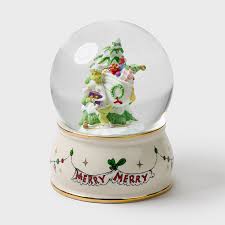
실제 시판 스노우볼 제품 사진 1장으로 광고 영상이 완성되는 전 과정을 단계별로 따라가보세요. 화면 그대로 똑같이 하면 됩니다.
STEP 1 · GPTs 열기 + 제품 사진 업로드
먼저 영상 스토리보드 전용 GPTs를 엽니다.
🎬 영상 스토리보드 + 프롬프트 생성 GPTs
제품 이미지만 업로드하면 광고 기획+콘티+영상 프롬프트까지 자동 생성
채팅창에 제품 사진을 끌어다 놓고, 한 줄로 컨셉을 입력하세요.
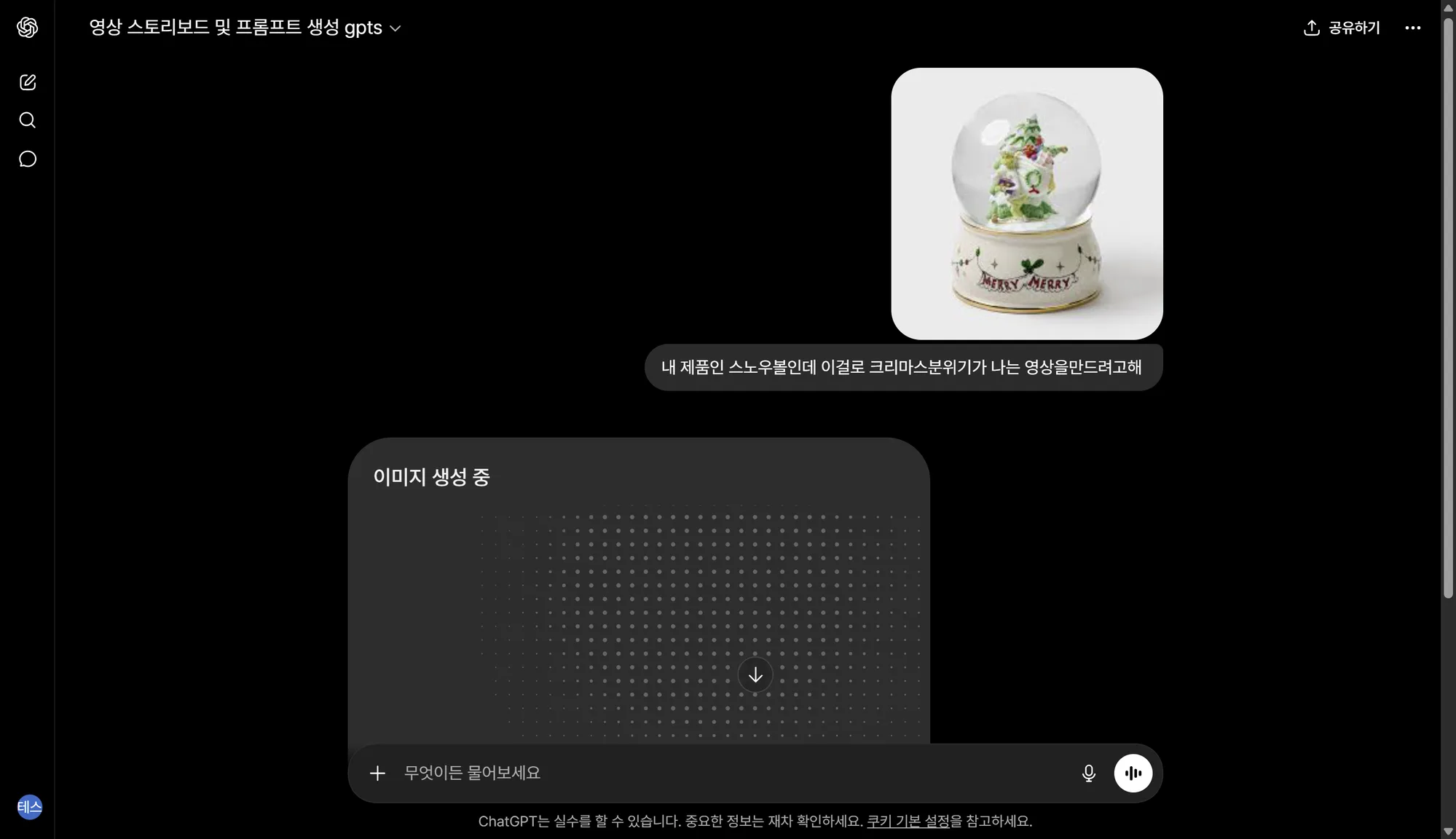
시연 입력 예시: "내 제품인 스노우볼인데 이걸로 크리스마스 분위기가 나는 영상을 만들려고 해"
STEP 2 · 8컷 스토리보드 자동 생성 (1~2분 대기)
GPTs가 광고 분석을 하고, 8컷 스토리보드 보드 이미지를 직접 그려줍니다. 각 컷마다 CAMERA / LIGHT / MOOD가 명시됩니다.
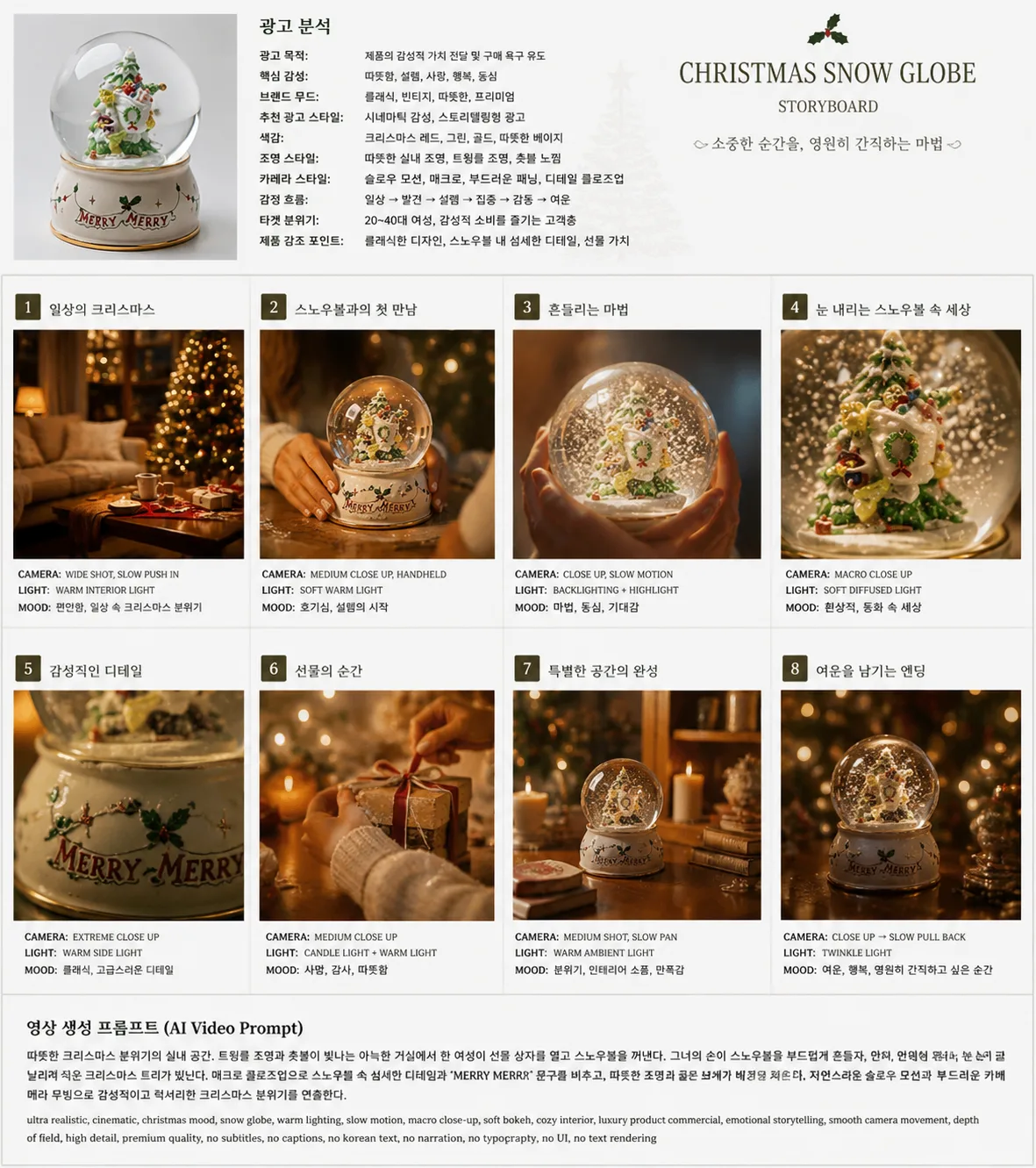
광고 분석표에는 — 목적, 핵심 감성, 브랜드 무드, 색감, 조명, 카메라 스타일, 감정 흐름, 타겟 분위기, 제품 강조 포인트가 모두 정리됩니다.
STEP 3 · 영상 프롬프트 받아오기
스토리보드 아래에 Dreamina에 그대로 붙여넣을 영어 프롬프트가 출력됩니다.
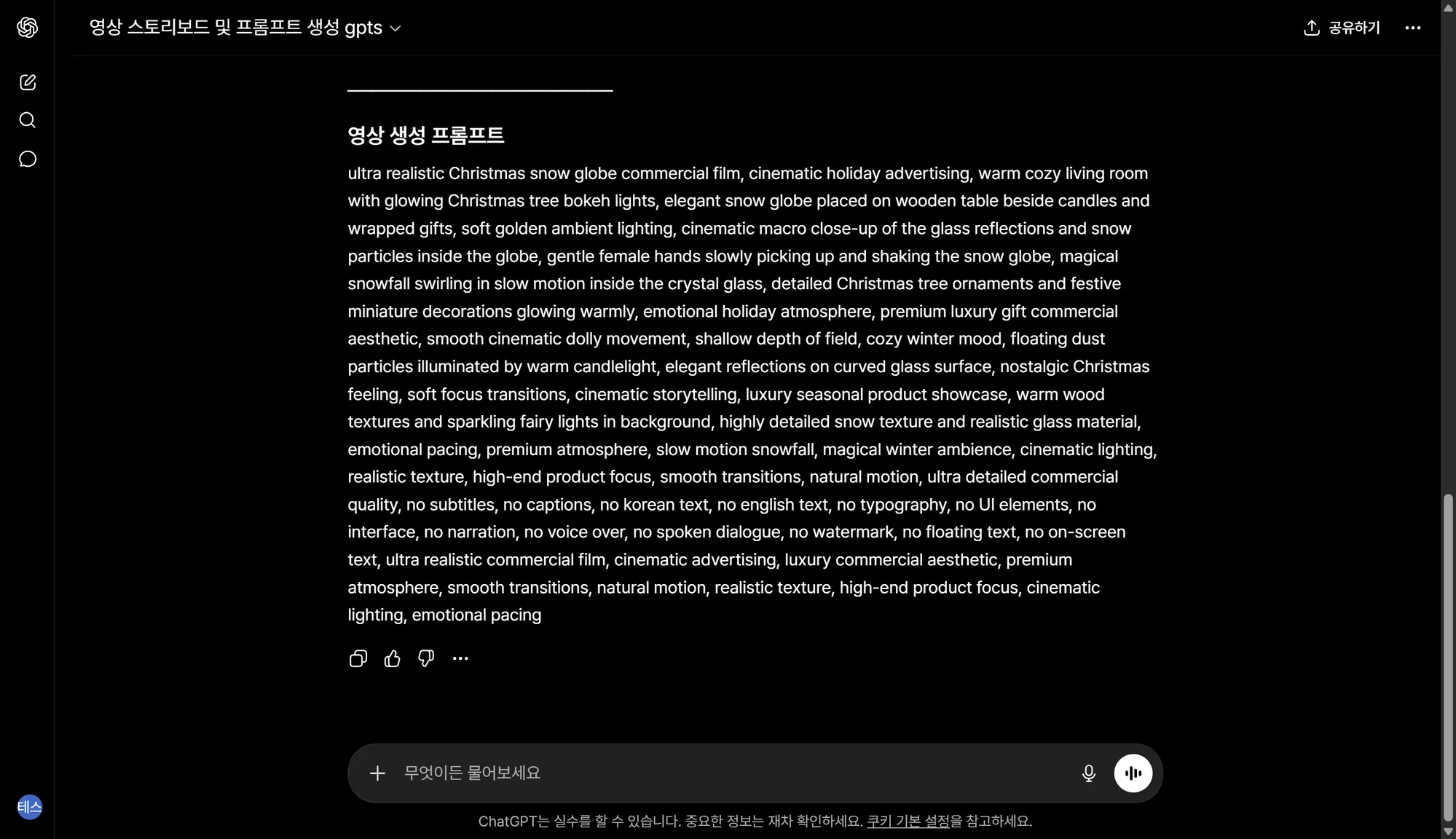
프롬프트 끝에 자동으로 "안정화 줄"이 붙어 있습니다. 이게 영상 품질의 70%를 좌우합니다(아래 설명).
STEP 4 · Dreamina에서 영상 생성
Dreamina에 접속해서 GPTs가 만든 프롬프트를 붙여넣고, 제품 이미지를 옴니 레퍼런스로 첨부합니다.
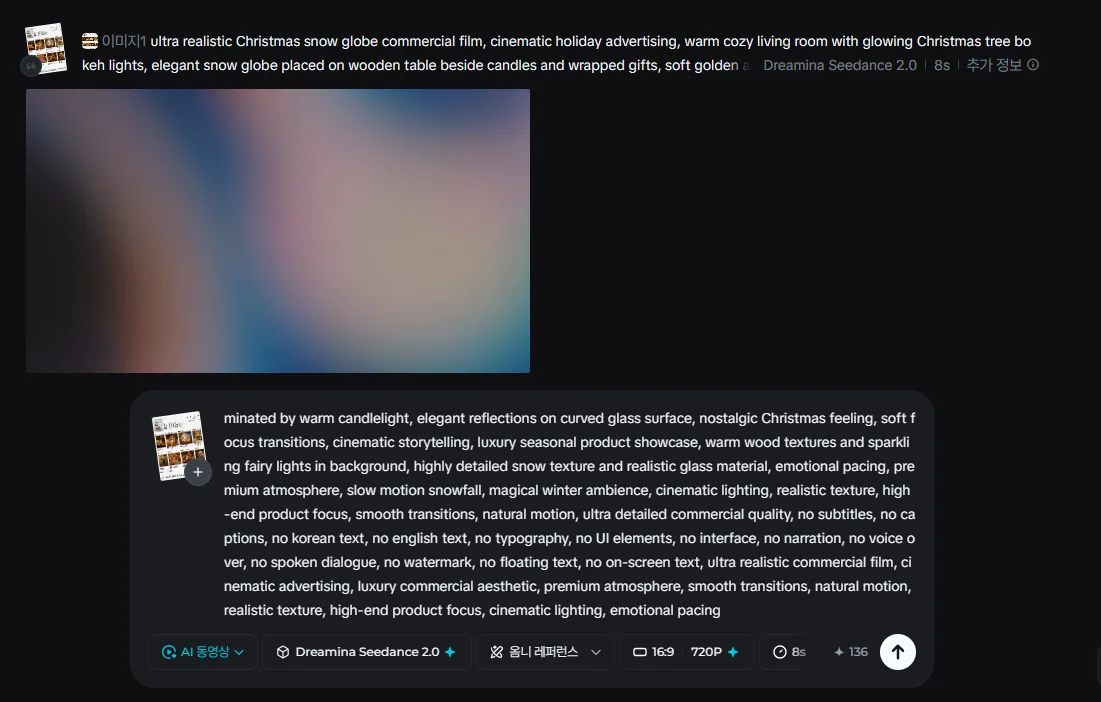
| 설정 | 값 | 비고 |
|---|---|---|
| 모델 | Dreamina Seedance 2.0 Pro | 최고 품질 |
| 비율 | 16:9 | 가로 (인스타 피드는 1:1, 릴스는 9:16) |
| 해상도 | 720P | 빠른 결과 (1080P도 가능) |
| 길이 | 8초 | 인스타 광고 표준 |
| 레퍼런스 | 옴니 레퍼런스 + 제품 이미지 | 제품이 그대로 영상에 등장 |
STEP 5 · 1~2분 후 완성 → 다운로드
생성 완료 후 다운로드 버튼으로 mp4 파일을 받습니다. 인스타 릴스/네이버 플레이스/카카오 채널에 바로 업로드 가능합니다.
전체 소요 시간: GPTs 2분 + Dreamina 2분 = 약 5분. 광고 회사에 의뢰하면 100만원, 외주는 30만원, AI로 5분.
시연 결과 (4편)
예시 1 · 크리스마스 스노우볼 광고 — 시판 스노우볼 사진 1장으로 만든 디올 수준 시즈널 광고
예시 2 · 빅맥 8컷 애니메이션 스토리보드
예시 3 · 옴샨티 핸드워시 광고 스토리보드
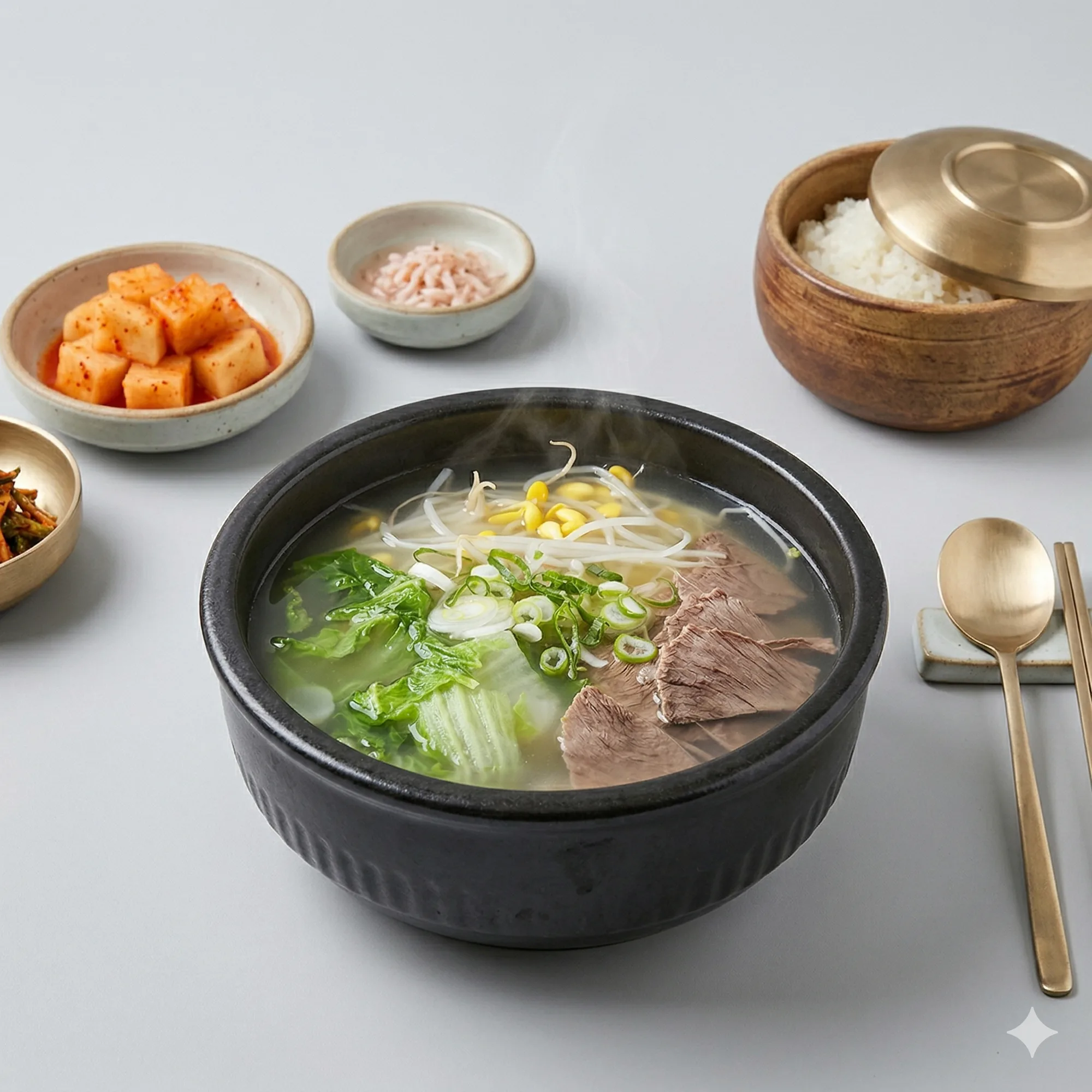
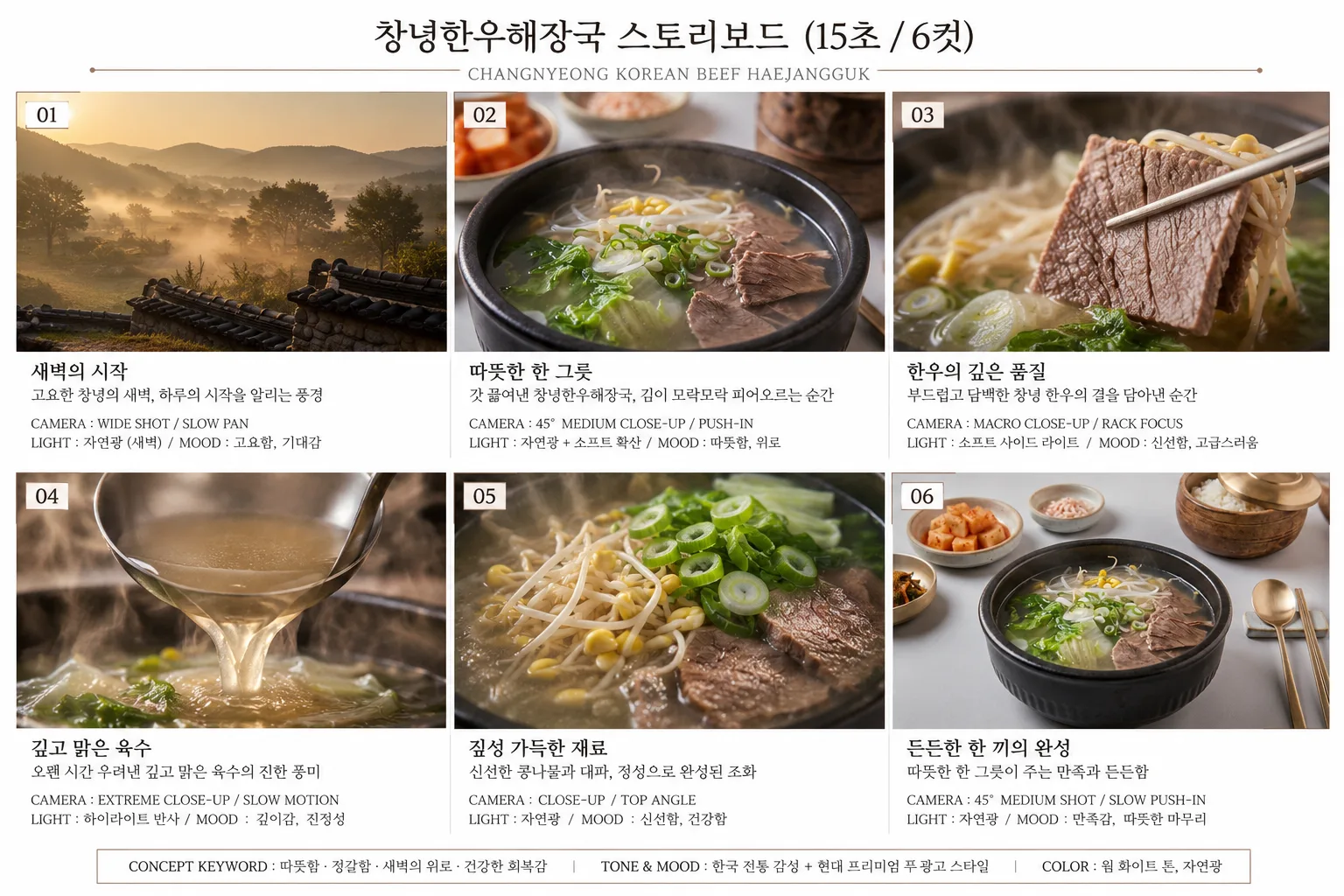
예시 4 · 창녕한우해장국 시네마틱 푸드 광고 (v2 GPTs 프롬프트 사례)
원본 제품 사진 1장:
GPTs가 만든 2×3 그리드 스토리보드 (15초 / 6컷, 컷별 CAMERA·LIGHT·MOOD 명시):
Dreamina Seedance 2.0 Pro 결과 영상 (15초):
포인트: v2 GPTs의 핵심 — 단일 그리드 + 시퀀스 강제 + 제품 일관성 + 타임스탬프 구조 — 가 모두 반영된 사례. 일반 제품 사진 1장이 한국 전통 미감 프리미엄 푸드 광고로 변신.
📋 사용한 영상 프롬프트 전문 보기 (클릭)
Animate the provided 2x3 storyboard into a smooth 15-second cinematic Korean premium food commercial. Follow the storyboard sequence of the 6 reference frames in image1. Scene setting: traditional Korean dining atmosphere, early morning mood, soft natural daylight, clean warm background, subtle steam ambience. Maintain unchanged across all frames.

Start with a calm sunrise landscape of Changnyeong countryside with soft morning fog and slow cinematic pan movement. Transition naturally into a steaming bowl of Changnyeong Korean beef haejangguk placed on a clean table. Slow push-in toward the soup surface while realistic steam rises gently. Macro close-up of tender Korean beef slices lifted slowly with chopsticks, showing realistic meat texture and moisture detail. Extreme close-up of rich clear broth pouring in slow motion with glossy reflections and floating steam particles. Close-up of fresh bean sprouts, green onions, and napa cabbage gently moving in the hot soup. Final hero shot: complete Korean meal setting with warm emotional atmosphere and elegant framing.

cinematic commercial film, ultra realistic, luxury food advertising, emotional pacing, smooth transitions, premium atmosphere, realistic broth texture, floating steam, glossy soup surface, cinematic lighting, natural motion, elegant camera movement, macro close-up, shallow depth of field, slow motion, warm Korean dining aesthetic, dramatic food lighting, soft reflections, steam particles, authentic Korean premium cuisine mood.

Camera motion focused only: slow push-in, pull-out, dolly movement, rack focus, gentle orbit shots. Product remains visually identical throughout all scenes. keep the product appearance completely unchanged, camera movement only, no rotation.

[0-2s] Wide sunrise landscape shot of Changnyeong village with soft fog, slow cinematic pan.
[2-4s] 45-degree medium close-up of steaming haejangguk bowl, slow push-in, warm natural light.
[4-6s] Macro close-up of beef slices lifted by chopsticks, shallow depth of field, steam visible.
[6-8s] Extreme close-up of broth pouring slowly into the bowl, glossy reflections and steam.
[8-10s] Top close-up of bean sprouts and vegetables moving naturally in hot soup.
[10-12s] Side angle close-up of bubbling broth and rich texture details.
[12-15s] Final frontal hero shot of the full Korean table setting, warm emotional finish, soft steam rising.

keep the product appearance completely unchanged, camera movement only, no rotation.
follow the storyboard sequence of the 6 reference frames in image1.
24fps cinematic frame rate.
Clip duration under 3 seconds per shot for stability and consistency.

no subtitles, no captions, no korean text, no english text, no typography, no UI elements, no interface, no narration, no voice over, no spoken dialogue, no text rendering, no watermark, no logo typography, no floating text, no on-screen text
영상 프롬프트 예시 (스노우볼)
GPTs가 출력한 그대로 Dreamina에 붙여넣을 수 있는 프롬프트:
ultra realistic Christmas snow globe commercial film, cinematic holiday advertising, warm cozy living room with glowing Christmas tree bokeh lights, elegant snow globe placed on wooden table beside candles and wrapped gifts, soft golden ambient lighting, cinematic macro close-up of the glass reflections and snow particles inside the globe, gentle female hands slowly picking up and shaking the snow globe, magical snowfall swirling in slow motion inside the crystal glass, detailed Christmas tree ornaments and festive miniature decorations glowing warmly, emotional holiday atmosphere, premium luxury gift commercial aesthetic, smooth cinematic dolly movement, shallow depth of field, cozy winter mood, floating dust particles illuminated by warm candlelight, elegant reflections on curved glass surface, nostalgic Christmas feeling, soft focus transitions, cinematic storytelling, luxury seasonal product showcase, warm wood textures and sparkling fairy lights in background, highly detailed snow texture and realistic glass material, emotional pacing, premium atmosphere, slow motion snowfall, magical winter ambience, cinematic lighting, realistic texture, high-end product focus, smooth transitions, natural motion, ultra detailed commercial quality, no subtitles, no captions, no korean text, no english text, no typography, no UI elements, no interface, no narration, no voice over, no spoken dialogue, no watermark, no floating text, no on-screen text, ultra realistic commercial film, cinematic advertising, luxury commercial aesthetic, premium atmosphere, smooth transitions, natural motion, realistic texture, high-end product focus, cinematic lighting, emotional pacing
🔥 가장 중요한 팁 — 마지막 "안정화 줄"
영상 생성 프롬프트의 마지막 한 줄이 영상 품질의 70%를 좌우합니다. 모든 프롬프트 끝에 반드시 추가:
ultra realistic commercial film, cinematic advertising, luxury commercial aesthetic, premium atmosphere, smooth transitions, natural motion, realistic texture, high-end product focus, cinematic lighting, emotional pacing, no subtitles, no captions, no narration, no korean text, no typography, no UI, no text rendering
| 빠지면 생기는 문제 | 안정화 줄로 차단 |
|---|---|
| 화면에 한글/영문 자막이 떠다님 | no subtitles, no captions |
| 깨진 한글 글자가 제품에 인쇄됨 | no korean text, no text rendering |
| 뉴스 자막바/UI가 들어감 | no UI, no interface |
| 여자 목소리 나레이션이 들어감 | no narration, no voice over |
| 워터마크/로고 텍스트가 박힘 | no watermark, no floating text |
| 영상이 평범해짐 | cinematic, luxury, emotional pacing |
규칙: GPTs 사용 시 자동 추가. 직접 프롬프트 쓸 때는 반드시 복사해서 끝에 붙이세요.
제품군별 연출 키워드 (GPTs가 알아서 넣어줌)
| 제품군 | 핵심 키워드 |
|---|---|
| 음식 (햄버거/피자/떡볶이) | sizzling, melted cheese dripping, floating steam particles, juicy meat texture, dramatic food lighting, slow motion sauce, macro close-up |
| 핸드워시·화장품·비누 | soft natural sunlight through forest, flowing water macro close-up, herbs and wood ingredients, realistic moisture texture, cinematic bathroom atmosphere, Aesop commercial aesthetic |
| 향수·뷰티 | floating dust particles, light reflections on glass, elegant slow movement, premium shadow, Dior commercial aesthetic |
| 시즈널 (크리스마스/명절) | warm bokeh lights, candle ambient lighting, nostalgic feeling, emotional pacing, magical winter ambience |
💡 글로벌 크리에이터 워크플로 7선 (EvoLinkAI 레포 분석)
오픈소스 GPT Image 2 × Seedance 2.0 Workflow Guide (CC BY 4.0) 30개 사례 중, 소상공인에게 직접 도움되는 7개를 선별했습니다. 각 워크플로는 X(트위터) 크리에이터들이 실제로 검증한 패턴입니다.
⭐⭐⭐ 핵심 워크플로 3선 — 무조건 시도해야 할 것
1. 제품 사진 → 숏폼 영상 광고 (이미 가진 사진 활용)
누구한테: 스마트스토어/네이버쇼핑/인스타 공구 사장님. 새로 촬영할 필요 없이 가지고 있는 제품 사진 1장으로 시작.
원본 출처: @insmind_com · GitHub 사례 26
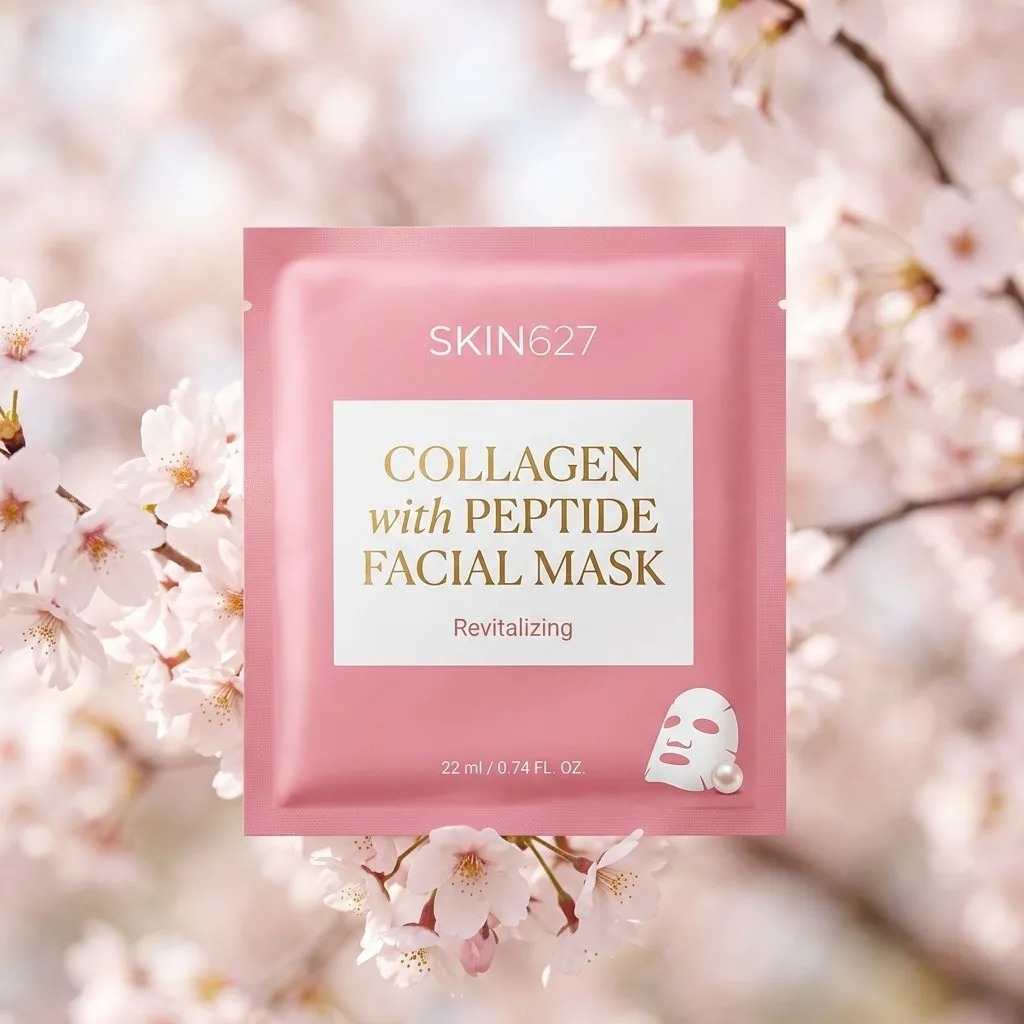
4단계: 제품 이미지 입력 → 핵심 장면 생성 → 모션과 구조 정의 → 스타일 제약 설정. 우리 강의의 Seedance 5단계와 동일하지만, **"기존 제품 사진을 그대로 재활용한다"**는 점이 다름.
📌 소상공인 활용: 옷가게 → 옷 사진 1장으로 모델이 입은 듯한 영상 / 화장품 → 패키지 사진으로 sephora 스타일 광고 / 액세서리 → 디테일 컷으로 럭셔리 광고
2. 시네마틱 푸드 영상 — 타임스탬프 기법
누구한테: 음식점·카페·베이커리·디저트 가게. 과정 영상이 핵심인 모든 업종.
원본 출처: @kingofdairyque · GitHub 사례 16
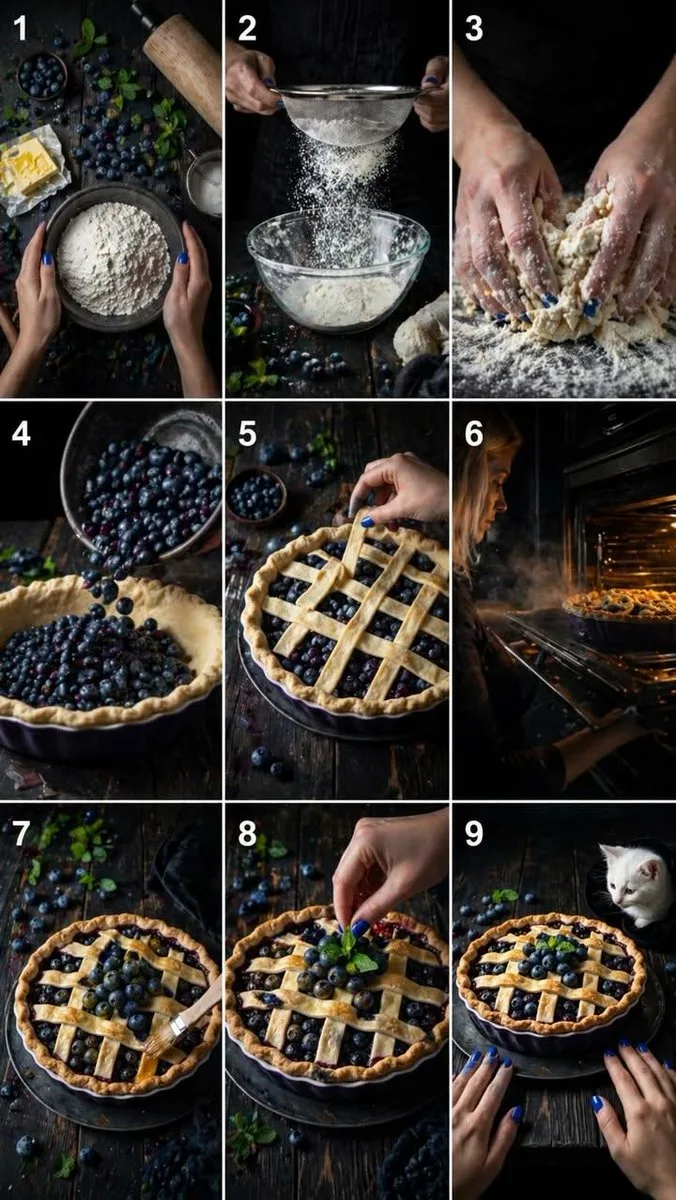
핵심 기법: Seedance 프롬프트에 02초 / 24초 / 4~6초 ... 구간별 카메라 앵글과 동작을 정밀 제어합니다.
[0-2s] Top-down shot: hands gently touch a bowl of [재료].
[2-4s] Side close shot: [조리 동작] in slow motion, catching warm light.
[4-6s] Macro shot: hands [동작]. Texture detail visible.
[6-8s] 45-degree angle: [재료] pours into [그릇].
[8-10s] Top angled close-up: hands [조립 동작].
[10-12s] Side shot: oven door opens. Warm golden light + steam.
[12-14s] Close-up: [마무리 터치]. Surface glossy.
[14-15s] Final frontal shot: finished [요리] on rustic table.
📌 확장 적용: 김치찌개 끓이기 / 라떼 아트 / 빵 굽기 / 칵테일 만들기 / 도자기 빚기 / 비누 만들기 — 모든 프로세스 영상 에 동일 패턴.
3. 스토리보드 우선 — 비용 1/10 절감
누구한테: 모든 사장님 (특히 처음 시도해서 시행착오가 많은 분).
원본 출처: @0xbisc · GitHub 사례 19
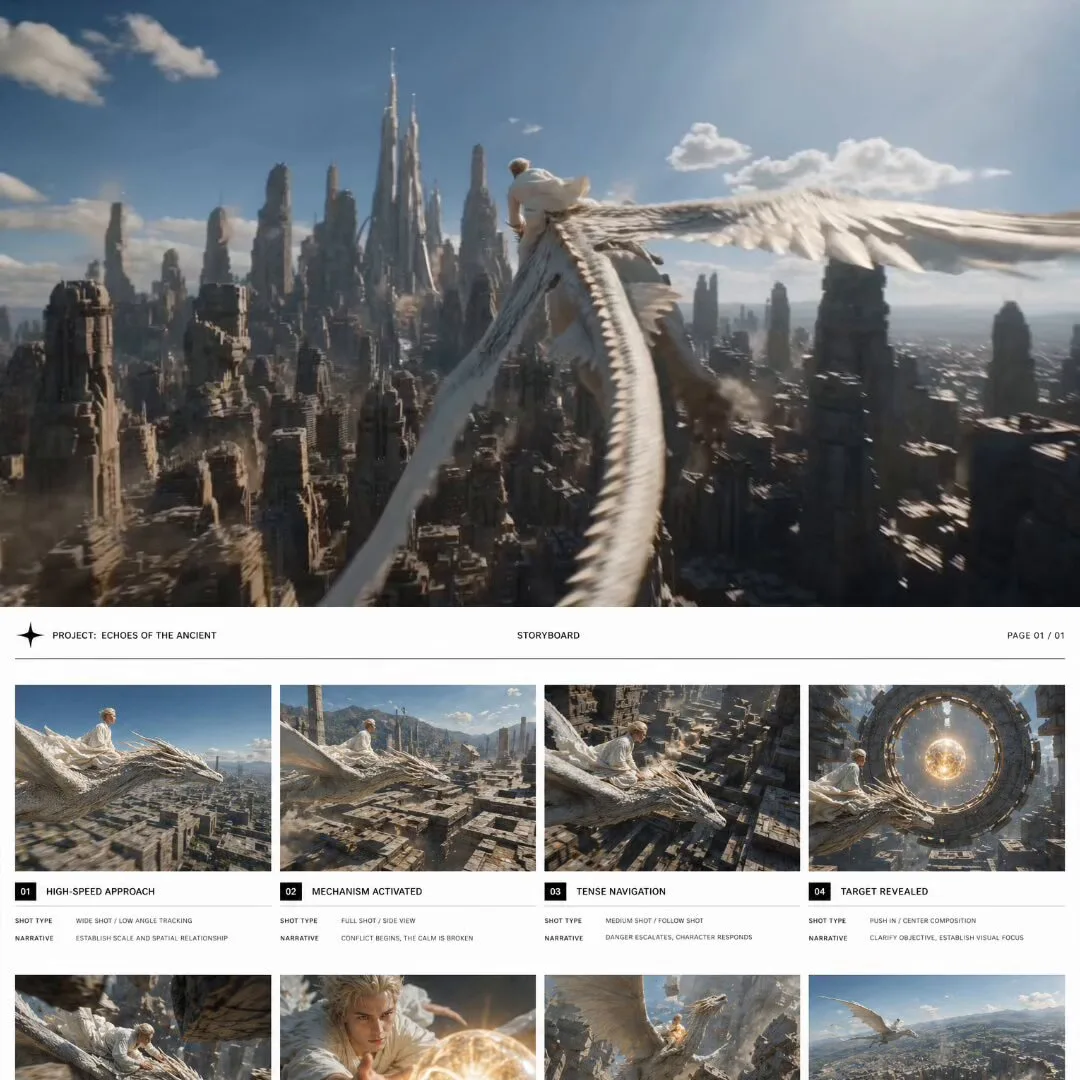
핵심 원칙: "영상 반복 생성은 이미지 반복보다 10~50배 더 많은 크레딧을 소모한다."
| 단계 | 무엇을 | 왜 |
|---|---|---|
| 1 | GPT Image 2로 8패널 스토리보드 그리드 생성 | 1회 = 매우 저렴 |
| 2 | 마음에 안 드는 패널만 골라 재생성 (이미지만) | 반복 자유 |
| 3 | 확정된 후에만 Seedance에 한 번에 영상 생성 | 영상 = 1회만 = 비용 1/10 |
📌 사장님이 자주 하는 실수: "영상이 별로니까 다시 만들어보자" 5번 = 한 달 크레딧 다 씀. 스토리보드에서 마음에 들 때까지 반복하고, 영상은 한 번만.
⭐⭐ 보조 워크플로 4선 — 업종에 맞으면 사용
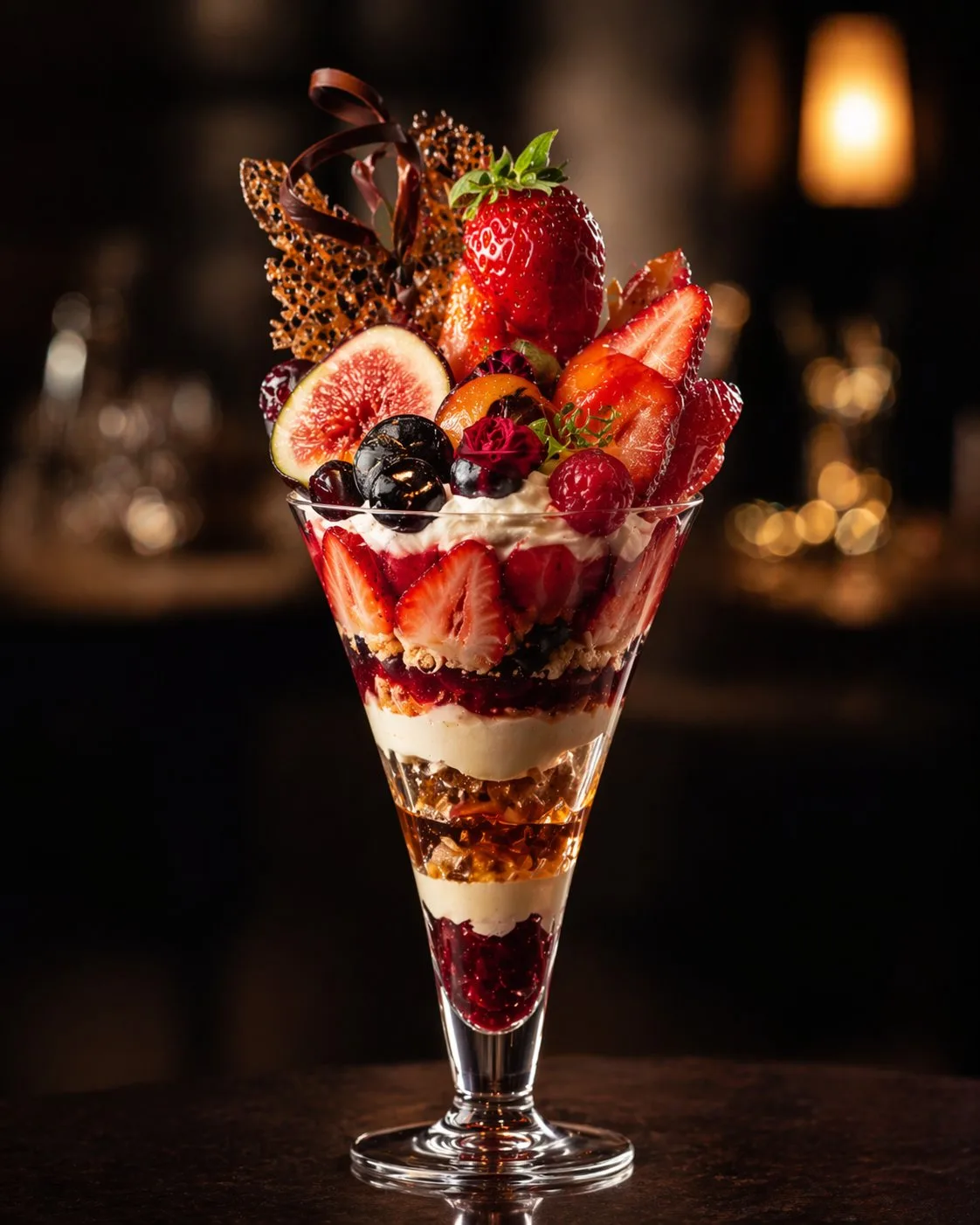
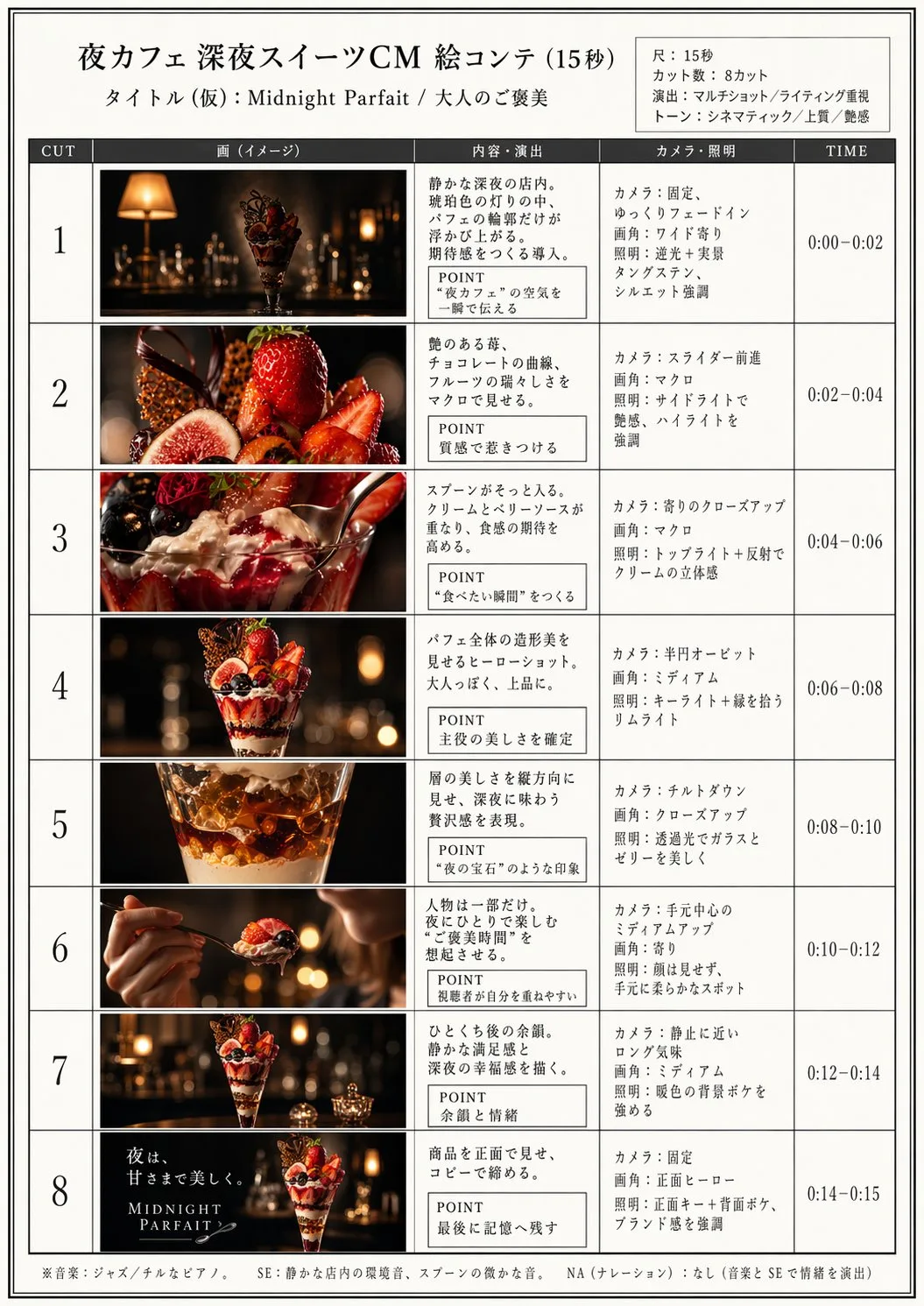
4. 15초 광고 — 패널 수 가이드
원본 출처: @ai_mitosan · GitHub 사례 6
영상 길이별 적정 컷 수 매핑 — 실패 없이 광고 제작:
| 영상 길이 | 패널 수 | 클립당 길이 | 추천 채널 |
|---|---|---|---|
| 15초 | 4–5 | 3–4초 | 인스타 스토리/릴스 |
| 30초 | 8–10 | 3초 | 유튜브 쇼츠/광고 |
| 60초 | 15–18 | 3–4초 | 유튜브 본편/홈페이지 |
 |  |
5. 럭셔리 브랜드 — 3×4 = 12프레임 스토리보드
누구한테: 향초공방, 핸드메이드 비누, 향수, 럭셔리 베이커리, 한방차, 수제 가죽 공방.
원본 출처: @insmind_com · GitHub 사례 15
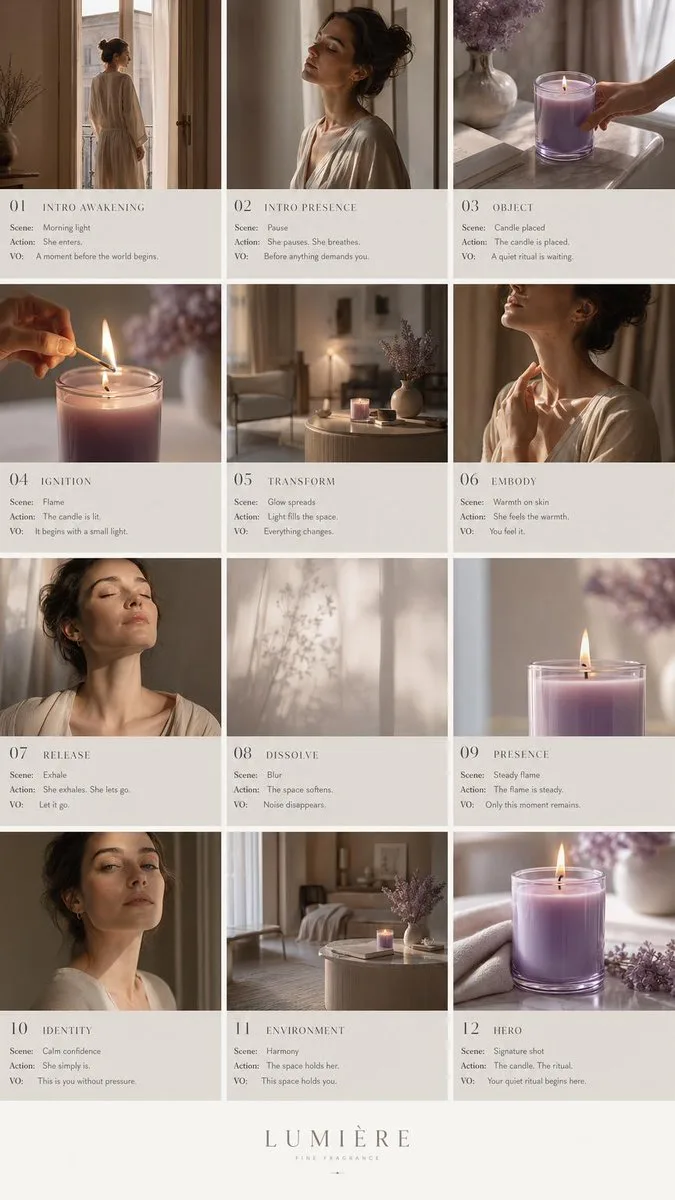
구조화된 흐름: 인트로 → 의식(ritual) → 변환 → 해결 → 브랜드 마무리 — 한 번 생성으로 완전한 광고 내러티브 완성. "에디토리얼 피치덱 레이아웃" + "제품(캔들)이 정서적 중심" 패턴.
6. 장인 제품 여정 — 6패널 기본 스토리보드
누구한테: 전통주, 수제 잼, 도자기, 가구, 한방차 등 "공장에서 고객의 손까지" 스토리가 있는 장인 제품.
원본 출처: @kiyoshi_shin · GitHub 사례 1
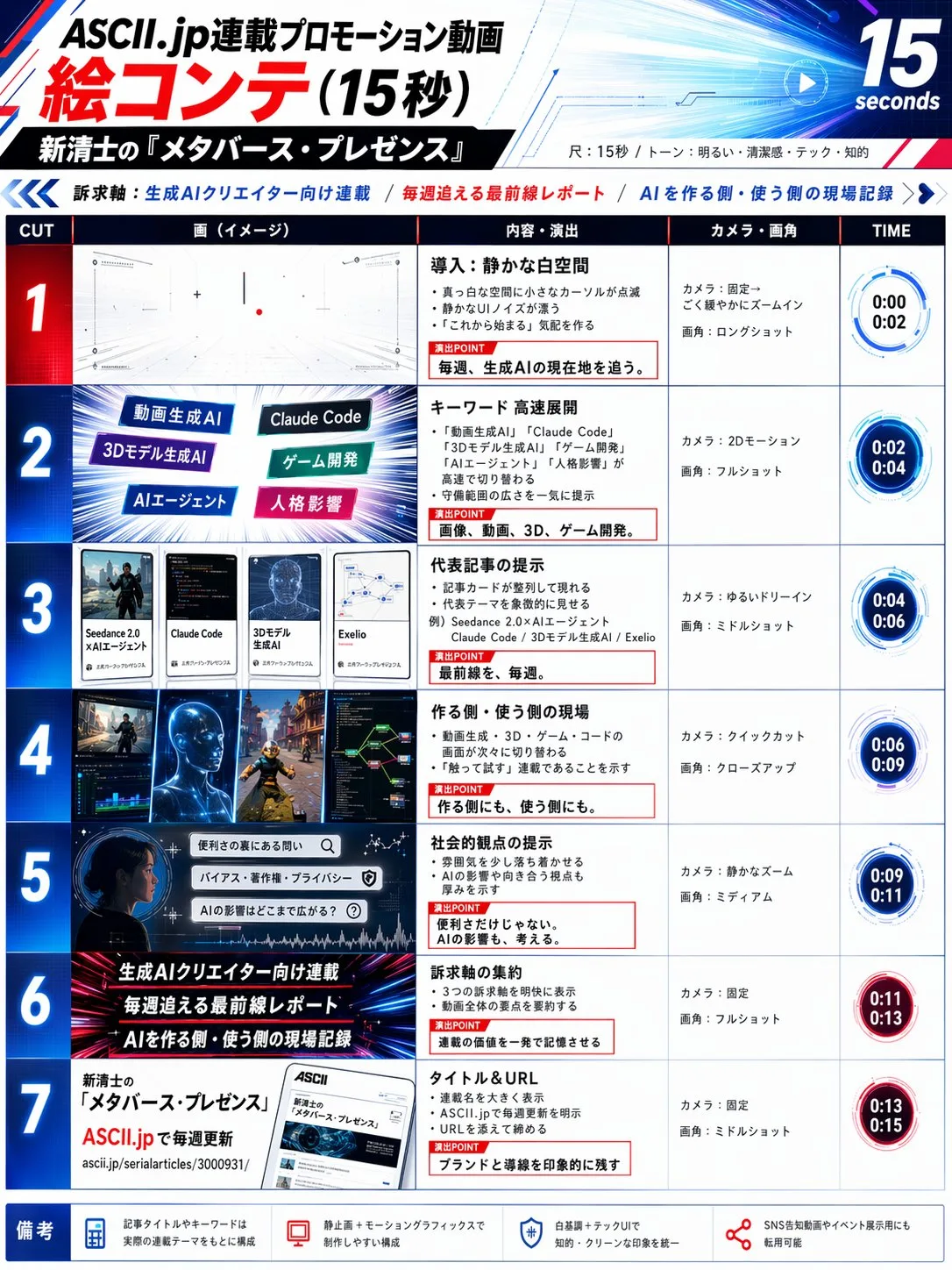
Create a 6-panel storyboard for a 15-second brand promotional video.
Style: cinematic, cool color tone, widescreen 16:9.
Content: the journey of a product from factory to the customer's hands.
7. 3×3 그리드 트릭 — 모든 워크플로 공통 베이스
누구한테: 모든 사장님 (필수 트릭).
원본 출처: @servasyy_ai · GitHub 사례 2
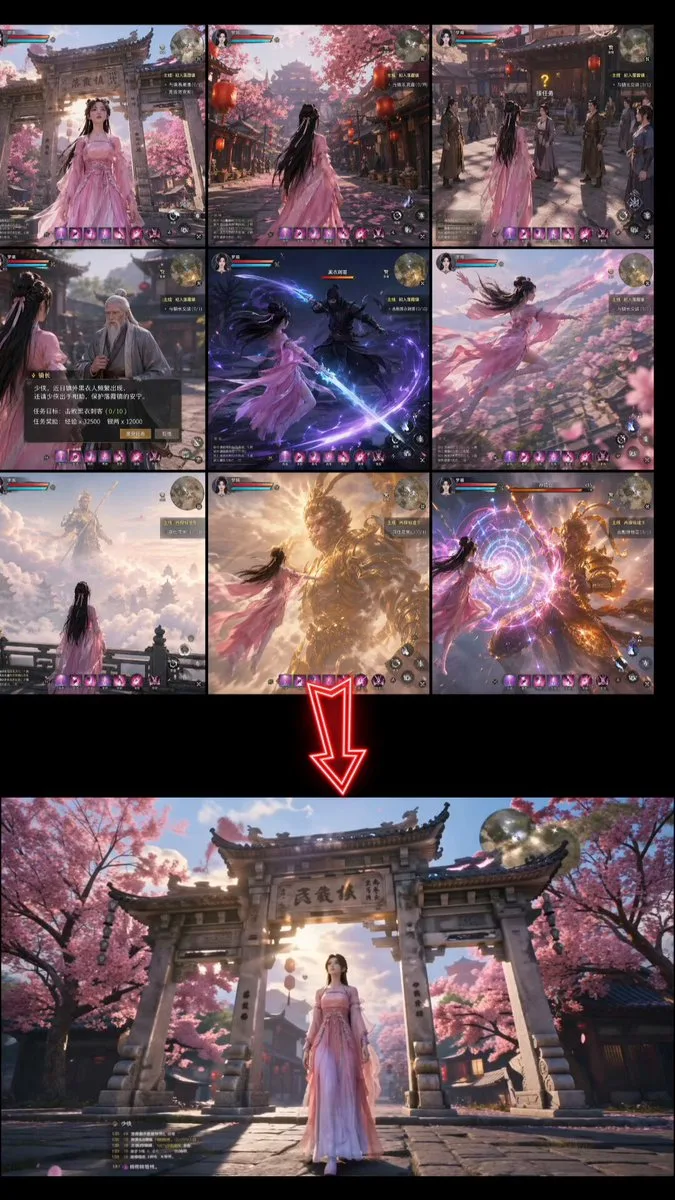
커뮤니티 발견 핵심 기법: 패널을 따로따로 가져오지 말고 9컷을 1장의 그리드 이미지로 만들어 Seedance에 입력. 실패율이 크게 ↓.
[describe your scene] and Create a storyboard in a 3×3 grid format
🔧 황금 팁 4가지 (모든 영상에 적용)
A. 제품 왜곡 방지 (의류·잡화·식품 패키지 핵심)
"Seedance에서 제품이 왜곡되는 근본 원인은 모션 보간이 세밀한 디테일 — 로고, 텍스처, 표면 패턴 — 을 다시 쓰기 때문이다."
프롬프트 한 줄로 해결:
keep the product appearance completely unchanged,
camera movement only, no rotation
추가 원칙:
- 피사체 모션 X, 카메라 모션 O — 제품은 고정, 카메라가 push-in/pull-out
- 클립 3초 이하 — 짧을수록 왜곡 적게 누적
B. 짧은 프롬프트가 이긴다 (반례)
@Iancu_ai 실험: "1500단어의 시네마 수준 Seedance 프롬프트가 한 문장에 졌다." 동일 캐릭터·동일 15초·짧은 프롬프트 우승.
의미: GPTs 프롬프트가 너무 길면 핵심 모션만 한두 줄로 줄이면 더 좋을 수도. 결과 비교해볼 가치.
C. 장면 일관성 (여러 컷 만들 때)
GPT Image 2 프롬프트 상단에 장면 파라미터 고정:
Scene setting: [위치], [시간대], [조명 방향], [고정 배경 요소].
Maintain this scene setting unchanged across all panels.
D. 범용 시퀀스 프롬프트 (장르 무관)
Use this storyboard to generate a video, follow the scene order,
keep transitions smooth, and preserve cinematic lighting and pacing.
📚 더 많은 워크플로 보기
위 7개는 소상공인 적합 기준 선별. 게임/뮤직비디오/캐릭터 애니/3D 등 30개 전체 사례는 원본 레포에서 확인:
📦 GPT Image 2 × Seedance 2.0 Workflow Guide (GitHub)
30+ 검증된 워크플로 + 프롬프트 템플릿 (CC BY 4.0, 한국어 README 제공)